1 Introduction
The purpose of this course is to develop knowledge and practical skills for working with large image datasets. The course will use Python, although the concepts and techniques covered are applicable to other programming languages, including MATLAB, C++, and R.
1.1 What is Python?
Python is a general-purpose programming language that is very popular in the scientific community. It was created in the early 90’s at the CWI, by Guido van Rossum. At Utrecht University it is the most popular programming language for open source research projects (see SWORDS-UU).
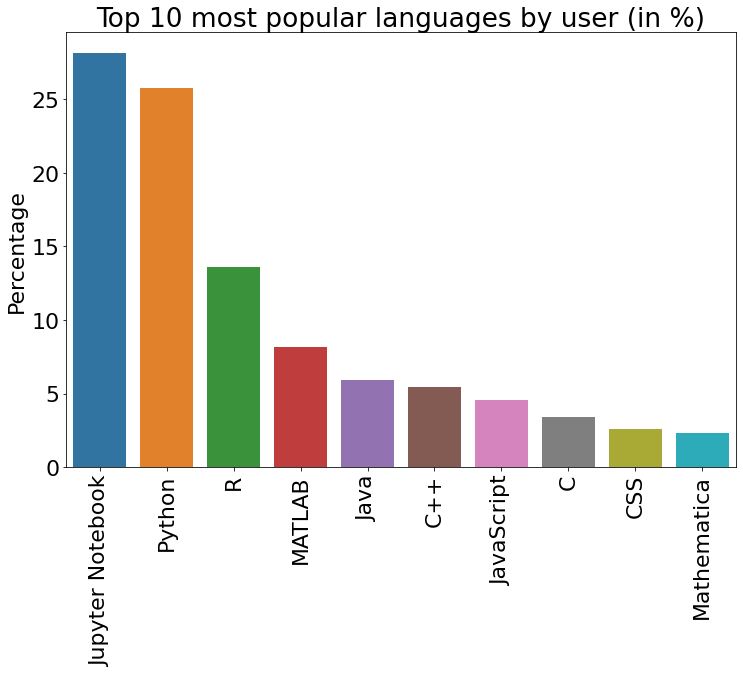
Python is popular due to its natural readability, ease of use, its large community, and its large ecosystem of packages that can be used for a large variety of tasks, ranging from data analysis, modeling, simulation, and machine learning to web development.
Python is open source, which means that it is free to use and that the source code is available for anyone to inspect and modify. This makes it easy to install Python on any computer, and e.g. share code with others or scale up your computations to a high performance computing system.
1.2 Jupyter Notebooks
There are many programs that can be used to edit and run Python code. This course will use Jupyter Notebooks and, later on, PyCharm. Jupyter Notebooks are a way to combine text, code, and output in a single document. Jupyter Notebooks are a great way to learn and prototype Python, as you can run code in small chunks and immediately see the results. But this doesn’t mean Jupyter Notebooks are only for beginners. Jupyter Notebooks are used by many professional programmers and scientists to share their work and even do computationally expensive analyses.
See below how a Jupyter Notebook looks like. The notebook is divided in text cells and code cells. The code cell contains Python code, which can be executed by pressing the ‘play’ button in the toolbar or by pressing <Shift>+<Enter>. The output of the code is shown below the code cell. The text cells contain text written in Markdown, which is a simple way to format text. You can edit the text by double clicking on the text cell. To render the text again, press <Shift>+<Enter>.
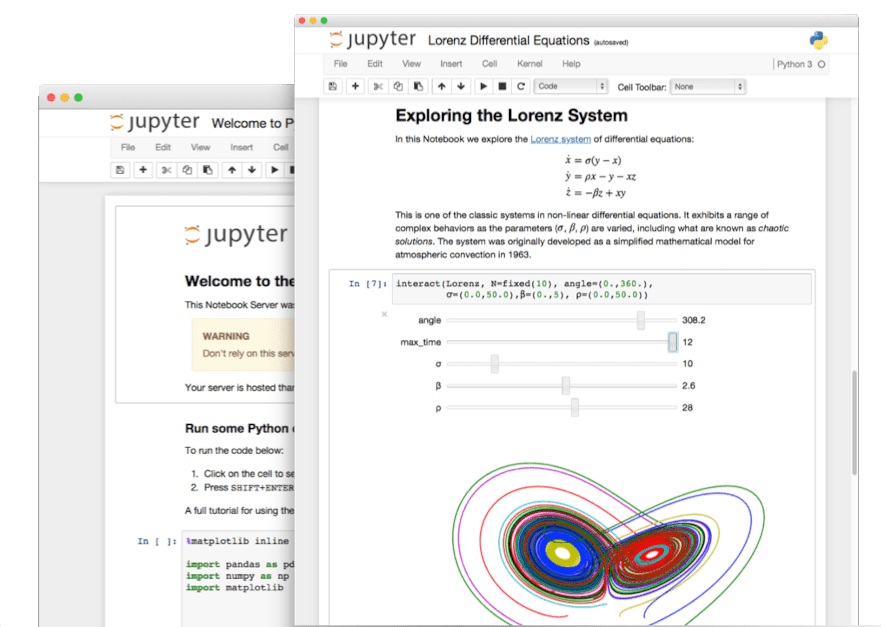 Example of a Jupyter Notebook
1.3 Course setup
This course follows the flipped classroom principle: courses are a combination of online material and exercises, with practical sessions under supervision at the UMC Utrecht.
The first week focuses on understanding the fundamentals and practical aspects of medical image formats. In the following weeks, you will progressively learn how to develop your own scripts, functions, libraries, and classes for medical image analysis.